ALARM
iOS shift alarms
Alarms stay attached to each shift, including a 23:00 to 07:00 night shift handled as one work block.
Wed 23:00 → 07:00
Shift's iOS alarms follow your rota, including night shifts that cross midnight. Pick a cycle, fill the month automatically, and keep hours adding up in the same place.
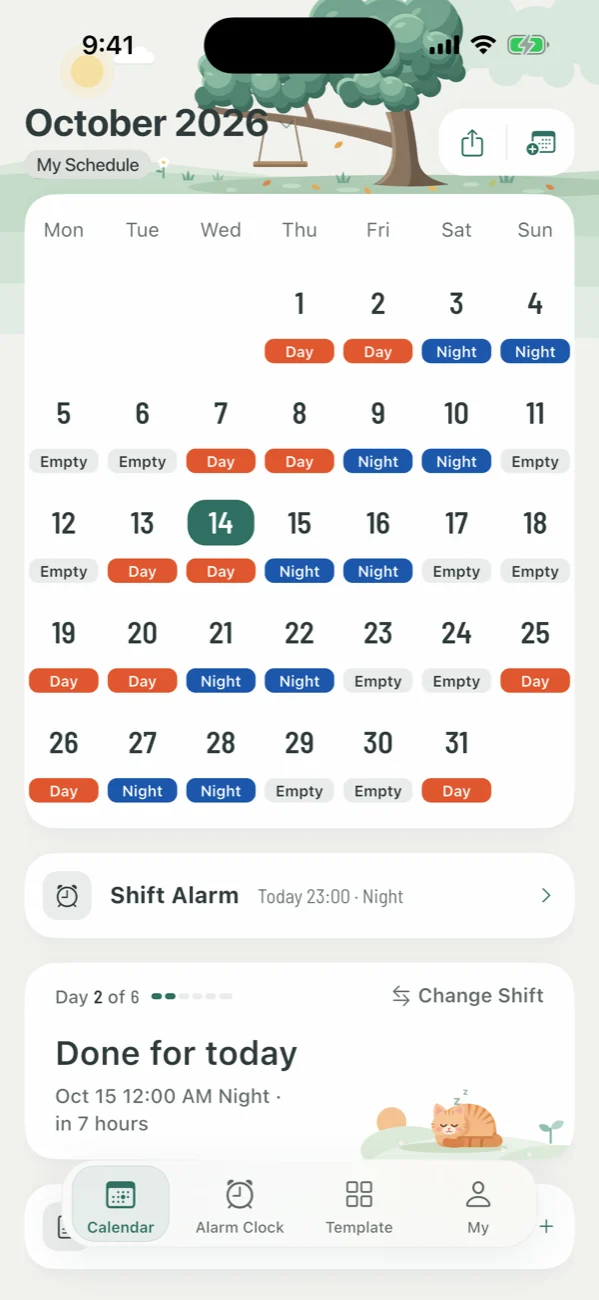
The core is not a generic calendar. It is an iOS shift alarm system that understands night work, midnight boundaries, and rotating cycles.
Alarms stay attached to each shift, including a 23:00 to 07:00 night shift handled as one work block.
Pre-built 3-shift, 4-shift, weekend cycles. Or design your own and reuse it forever.
Set a cycle once and the calendar fills the whole month — no day-by-day setting.
Daily, weekly, monthly, quarterly, yearly totals — visible right where you plan.
Pro members export to Excel and CSV for payroll, manager review, or personal records.
One Pro purchase, up to five family members. Sync schedules with the people you live with.
Shift is an iPhone and iPad planner for rotating shift work. It combines cycle templates, shift-aware alarms, and hour totals inside one schedule calendar.
Choose or create a shift cycle, then apply it to a date range. The calendar fills the month automatically, while alarms and hour totals stay attached to each shift.
It removes repeated day-by-day schedule entry, manual hour counting, and fragile night-shift alarm setup, especially for shifts that cross midnight.
A cycle is just a rotating sequence of shifts. Pick the cycle that matches your rota, and Shift fills the calendar — including alarms — automatically.
Three-shift, four-shift, or anything in between. Customize names, hours, and colors.
Pick a start date and a span. Shift writes the whole month in seconds.
Tap any cell to swap, skip, or add a memo. The cycle keeps running underneath.
Each shift carries its own ringtones and reminders. They update with the rota.
All scheduling stays free. Pro adds the tools you'll appreciate by month three: payroll-grade exports, a quiet ad-free interface, and Family Sharing.
Unlock Pro once
View local priceThe App Store shows pricing for your region.
Includes a 7-day trial
View subscriptionManage or cancel anytime in your App Store account.
Includes a 3-day trial, renews monthly
View subscriptionManage or cancel anytime in your App Store account.
Subscriptions auto-renew unless canceled at least 24h before the period ends. Manage anytime in your App Store account settings.
Short, factual answers. If you need anything else, see the support page.
Frequently asked questionsYes. Calendar, cycles, templates, shift alarms, and basic hours are free forever. Pro adds export, ad-free, Family Sharing.
Yes. Built-in templates cover 3-shift / 4-shift, and you can define any cycle length and shift mix yourself.
Yes. A night shift starting at 23:00 and ending at 07:00 is treated as a single shift; alarms keep firing across the day boundary.
iPhone and iPad on iOS 13 or later. Android coverage will follow.
Today schedules live on-device, with Family Sharing for Pro members. iCloud sync is on the roadmap.

Free to download. No account required to start. Pick a cycle, sleep well.